Inspection & Test Plans
Hold and witness points for controlled activities, moved through the same draft/review/approved/superseded lifecycle as Safe Work Procedures.
Last updated 6 September 2026 · v1
Overview
An Inspection & Test Plan (ITP) defines the hold points and witness points for a controlled activity — the points in a process where work must stop for an inspection (a hold point) or where an inspection may be witnessed without necessarily stopping work (a witness point), together with a reference and revision number for the plan itself.
Why it matters
Quality control on a controlled activity depends on inspections happening at the right point in the process, not after the fact. Recording hold and witness points as fields on a versioned plan — rather than in a separate document nobody checks against the current revision — keeps the plan itself as the single reference for what inspection is required and when.
How it works
An ITP moves through the same four-stage lifecycle as Safe Work Procedures — draft, review, approved, superseded — using the identical status values, though the two are tracked as separate fields on separate records rather than a single shared concept in the underlying data. As with procedures, the expected pattern is to create a new revision when a plan changes materially and mark the previous one superseded, rather than editing an approved plan in place.
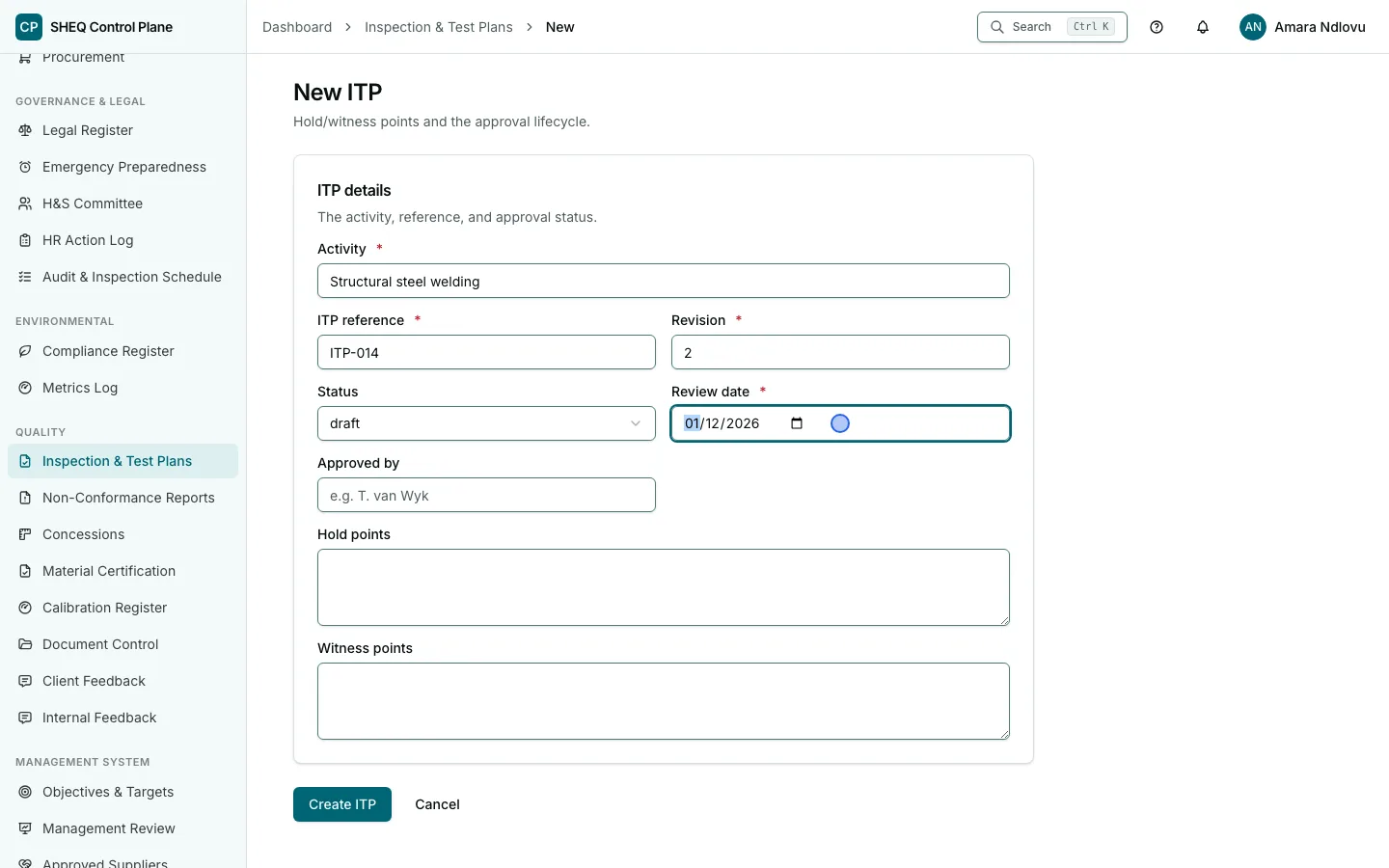
This screen
The list page shows every plan with its reference, revision, status and review date, filterable/sortable by review date, status, or when the record was created/updated. The detail page shows the full plan including hold and witness points; create and edit forms share the same fields.
Fields
- Activity — required. The controlled activity this plan covers.
- ITP reference — required. The plan's own identifying reference number.
- Revision — required. This plan's revision identifier — bump it when the plan changes materially.
- Hold points — optional free text. Points in the activity where work must stop for inspection before continuing.
- Witness points — optional free text. Points where an inspection may be witnessed without necessarily halting work.
- Status — one of
draft,review,approved,superseded. - Approved by — optional. Recorded once a plan reaches
approved. - Review date — required. When this plan is next due to be reconsidered.
Actions
Moving a plan between statuses, including to approved, is a direct field edit, gated by the same write permission as any other change to this register — there is no separate, more restrictive approval permission layered on top (see Settings).
What happens next
A non-conformance found during an inspection against this plan's hold or witness points would typically be logged as its own Non-Conformance Report — the two registers are not linked by a relational field today, so cross-reference them by ITP reference/NCR number manually if needed.
FAQ
Are hold points enforced anywhere else in the product? No — they're descriptive fields on the plan record. Nothing elsewhere in the application currently blocks progress on a related record because a hold point exists.
Related documentation